
 Overview
Need a new laptop for your office work, but don't want to be stuck with one that looks like it's out of the Dark Ages? Well, Toshiba might have the answer with its new laptop in the Equium range named the Toshiba U400-145. No longer will you have to hide in the corner with your laptop like Gollum, but then again you might do anyway to protect your precious!
Review
Style
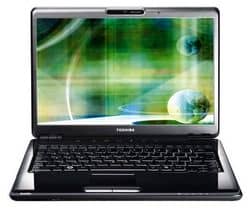
Touting a standard glossy black finish look, this laptop will look perfect in just about any room (well maybe not a black room).
One such feature of this laptop is the 13.3″ Wide Format XGA TruBrite screen that this laptop comes with, meaning that not only is this laptop small and compact, but thanks to its TruBrite technology the screen will display an image that is hard to believe coming from such a small screen.
Another is its in-built webcam that had face recognition technology as well as a microphone so it's easy to stay in touch with people over MSN and other well known video chat programs.
Otherwise this laptop really is as small as I have been going on about, however it's not as small as an Eee or Wind but this laptop will help keep your desk space clutter to a minimum and with it weighing in at only 1.97 kg this should be light as a feather to carry.
Under the bonnet
With this being an office laptop, do not expect the specs to be amazing, this is by no means a gamer's laptop but it will handle your office applications with ease.
This is all thanks to its Intel Pentium Dual Core T2390 processor, which runs at a very healthy 1.86GHz and with its 2GB DDR2 RAM propping up the processor you can expect your multiple office applications to run without missing a beat.
Storage wise this comes with a 160GB hard drive, which is plenty to store your files as well as a few MP3’s and Movie files to keep you going on the train.
As I have said before this is by no means a gaming machine (unless you want to play games from the early 2003 era) this is thanks to its Intel X3100 Integrated card. Even though this machine comes with 356MB of memory to use it is by no means a gaming graphics card. It will handle anything pre-DirectX 9 and maybe even a few unflashy DirectX 9 games but with the settings on low.
The Gaj-It Verdict
Design 9/10
Usability: 8/10
Features: 6/10
Value: 7/10
We Say
This is an excellent office laptop, offering both design and technology improvements on the usual standard. Just don’t be using this for anything other than work as it’s not much of a gamers laptop.
Technical Specs
- Intel Pentium Dual Core T2390 / 1.86 GHz, 533 Mhz, 2 MB Cache
- 2 GB DDR2 RAM
- 160 GB
- DVD Super Multi
- 13.3" Widescreen
- Intel X3100 Integrated
- Bluetooth – No
- Notebook Camera – Integrated – 1.3 Megapixel
Shop For It
5 thoughts on “Review: Toshiba U400-145 – The Perfect Office Laptop”
I read your review and went for the toshiba u400-145 how do you set up the bluetooth? I can’t find it.
Have a look on your computers device manager, if its not listed there then you might have brought a model that does not include the Bluetooth.
If it is there post up here again and i’ll help you some more
It’s not there. The Toshiba U400-145 does not have bluetooth you must have reviewed the Toshiba U400-146 wich does, so the info you gave was wrong and it would be best if you edited it so no one makes the same mistake I did after reading your review.
You are indeed right carlo, I have amended the post accordely and please accept my apoligies for mis-directing you.
It seems even us bloggers make mistakes
Get cheaper deals on this laptop and more
Have a look at LavaComp at http://www.lavacomp.co.uk