
 Overview
With the credit crunch looming over us everyday, people are wanting a laptop to offer them as much performance for their pound than ever before.
With Dell laptops appearing in a PCWorld store near you, it’s become easier than ever to get your hands on a Dell laptop.
So as the Dell Inspiron 1318 hits the laptop scene, we find out whether this budget laptop deserves the title ‘budget’ or does it offer us a little more than we have come to expect.
Review
Style
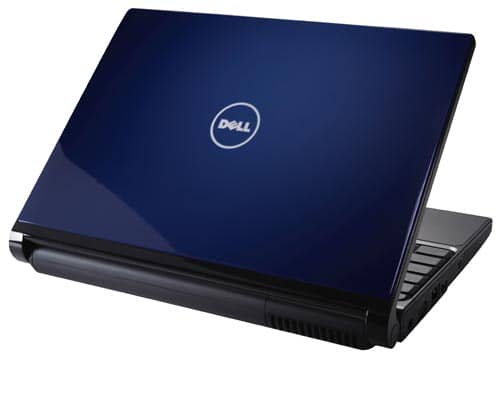
Sporting the new Dell coloured designed case from Dell, this laptop comes in a stylish blue colour as pictured above, however if you prefer it then it also comes in the standard black as well. Touting a 13.3″ TrueLife Widescreen, it is not the biggest screen size available for this price range, however the TrueLife technology behind this should produce an impressive image display. Plus with a webcam available on the laptop as standard, MSN video communication should be a walk in the park.
Another smart little feature on this laptop is the disc drive. Gone is the standard tray design and has instead been replaced with a slot which will remind people of the Nintendo Wii in terms of just slotting it in.
Under the bonnet
This laptop comes with the all powerful Intel Core 2 Duo Processor which has boosted Intel’s processor sales through the roof. The model running on this is the lower spec version, the T2390 this runs at a 1.86 GHz but bear in mind this means x2 and that many applications are now being released that support dual cores so you will be getting the benefit of two processors speeds rather than one.
The amount of RAM that comes with this laptop is 2GB; whilst it’s not wow in terms of performance it does mean that office applications will run on this perfectly, which is what you expect from a budget laptop.
Hard drive wise, this comes with a below standard 160GB which is a fair bit lower than most models on the market. It does however allow you to store and extensive amount of Word, Excel etc files not to mention a fair few other programs as well as the few MP3/AVI files to boot.
Gaming wise this is another definite no no; having being built with a INTEL X3100 graphics card this laptop does by no stretch of the imagination be able to handle the pressures that come with gaming life. The few golden oldies will run-on this but games such as FEAR and CONAN will laugh at you for even attempting to run this, that's if it does not overheat your laptop before the opening menu.
Otherwise this laptop comes with everything you will need which include, WiFi, Bluetooth etc. The amount of USB ports on this laptop accumulate to one so unless you have a external hub you may have to purchase a cheap one to get all your USB Devices to run on here.
The Gaj-It Verdict
Design 9/10
Usability: 9/10
Features: 7/10
Value: 7.5/10
We Say
If you want a laptop that sports a well known name then this is the laptop for you, otherwise shop around and see if you can get a better deal for same amount of cash.
Technical Specs
- Processor – Intel Pentium Dual Core T2390 / 1.86 GHz ( Dual-Core )
- 2 GB
- 160 GB
- Genuine Windows Vista (R) Home Premium
- 13.3″ TrueLife Widescreen Display
- DVD ReWriter Drive
- INTEL X3100
- Bluetooth
- Notebook Camera – Integrated

10 thoughts on “Review: Dell Inspiron 1318 – A smart budget laptop on the move”
I hope it will included with nice battery performance,
It all depends on what you are doing on the laptop at the time. But i would expect the standard laptop preformance
i would like to downgrade the operating system on my laptop from viats to XP but am having problems with drivers. Any idea how i can go about it?
Hi Nelly,
It seems alot of people want to do the exact same thing you wish to. I simply typed in Dell Inspiron 1318 Win XP Drivers into Google and can up with aload of posts on the subject.
Some you might find helpful are the following sites
http://www.laptops-drivers.com/dell-laptop/how-to-install-windows-xp-into-dell-inspiron-1318.html
http://www.fixya.com/support/t1013309-drivers_dell_inspiron_1318_xp_operating
Any problems just post on here again.
i disagree with the gaming part i can run World of Warcraft on this computer for hours and hours with no problem its running at least 40 frames a second all the time.
i love this :)
i have Dell Inspiron 1318.
I am facing a problem regarding DVD ReWriter that it is not detecting any DVD ROM and not writing DVD but it is reading CDs. its reading response is also very slow…
can anyone tell me the solution of this problem…
Plz
Plzz
Plzzzzzzzzzzzzz
I am facing the same problem and also DVD ReWriter is not reading Bootable CDs and DVDs at startup to from CD or DVD…..
Plz
Plzzzz
Plzzzzzzzzz
Plzzzzzzzzzzzzz
PLzzzzzzzzzzzzzzzzzzzzzzzzzzzzz
anyone help me to solve this problem
Okay, so, I’ve had this computer for a little over two years now and I have to say, it’s amazing. The battery life is phenomenal, the screen is bright and gorgeous and it’s VERY easy to use. I LOVE it. I had a Toshiba laptop before this computer and the Toshiba crashed a few weeks after I bought it. The Dell was a total breath of fresh air. It’s durable and sturdy. I absolutely love it. (:
Battery life (4 cell) is terrible. Could not upgrade to 9 cell when I ordered. Separate 9 cell battery is $150.
Both hinges have broken, after only one year. I’m paying Dell $169 to replace the hinges.