
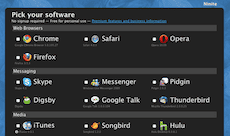
 When I did finally upgraded to Windows 7 yesterday (and since my PC needed a good clean out) I decided to do a fresh install rather than upgrade from Vista. One thing that made my new install a lot easier was Ninite. Ninite is a simple installer which downloads and installs silently (meaning you don’t need to answer all the questions about where to install it or do you want a desktop icon etc) up to 59 of the top freeware programs that are essential for any PC.
Once you have a fresh copy of Windows installed you need to start adding 3rd party software to make your PC fully usable. If you want to watch things on YouTube then you need Adobe Flash. If you want to sync with your iPod then you need iTunes. In fact when you think about all the major tasks we perform on our PCs including browsing, instant messaging, creating documents and spreadsheets, watching films, listening to music and burning DVDs then there is lots of stuff that needs to be downloaded and installed.
With Ninite it is simple. You go to the Ninite website, tick the boxes next to the software you want to install and then download the installer. Once saved on your PC you just double click it and Ninite will do the rest. It will download each of the programs you wanted and install them. All you see on the screen is the progress bar.
Having installed Windows 7, I took Ninite for a spin and it works as advertised. I clicked on what I wanted and then downloaded and ran the installed. It just worked. I guess it probably saved me at least 3 hours of hunting around the net and installing programs.
The Ninite selection is quite large (59 programs) and it is probable that you won’t need all of them… Here is my personal picks from the Ninite list:
- Firefox
- Skype
- iTunes
- VLC
- Audacity
- Spotify
- Paint.NET
- Picasa
- OpenOffice
- Adobe Reader
- AVG
- Flash Player 10 (for other browsers)
- Flash Player 10 (for Internet Explorer)
- Java Runtime
- Microsoft .NET 3.5 Service Pack 1
- Microsoft Silverlight 3.0
- Dropbox
- Google Earth
- 7-Zip
- PuTTY (helpful if you are using FreeNAS)
You preferences might be different but on the whole EVERY PC should have the above list installed!
Let us know what you think? What are your favourite Ninite applications? Please add a comment below.
One thought on “Moving to Windows 7? Get 59 Free Apps Installed All At Once With Ninite”
I’ve use Ninite before. It is well recommended whenever you install windows on any machine. So simple and always the latest version.